Showing posts with label CAD tools. Show all posts

05 June

Installation of Synopsys EDA tools

Most of the EDA tools used in the VLSI Industry are designed for use in UNIX operating system. These tools must require licenses to work which can be purchased from EDA Companies or a company that is authorized for sales and supports. Synopsys tools can be purchased either from www.synopsys.com or from authorized sales and support partner www.eigen.in (in India). 

Once you buy the tools, they provide login credentials on their website. Using the login credential the licenses and tools can be downloaded to your local machine/server. We can also update the licenses whenever it gets expired and we can also download the latest release of any tools from the website using the login credential. For Synopsys tools, we need to login into their official website https://solvnet.synopsys.com to download the tools and licenses.

Generally, EDA companies provide support to install the tools and help in case of any issue, but it's better to know the installation process of tools and basic debugging to manage the tools in our own hands. The following section is going to describe how to download and install the Synopsys tools in your local machine/server.

Step-1: Download the synopsys installer, SCL and tools setup files

Go to https://solvnet.synopsys.com and login with your login credentials.

Solvenet Login

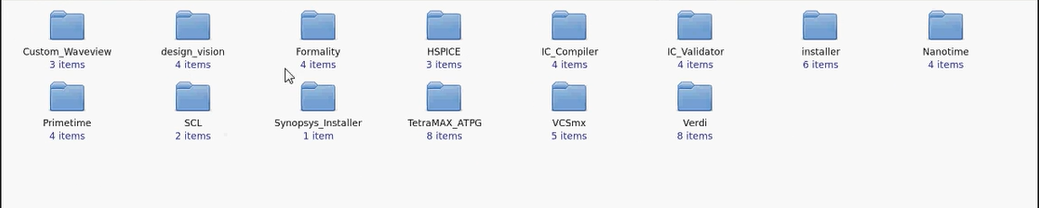
After login, you need to download:

  1. Synopsys Installer (An application which provinde nice gui interface to install the tools)
  2. SCL (Synopsys Common Licensing)
  3. All the EDA tools which you have license and want to install.
  4. Synopsys license (Incase it is not set already)

Step-2: Launch the synopsys installer GUI

Step-2.1: Open the terminal with root prevelage and go to the directory where synopsys installer is downloaded.


Step-2.2: Provide the execute permission to the synopsysInstaller.

chmod 755 synopsysInstaller_V3.2.run

Step-2.3: Run the following commands to unpack the installer ( -d switch is for creating a directory)

 ./synopsysInstaller_V3.2.run -d installer

Step-2.4: Go to installer directory created in above step and if you see the contents, it will look like. 

cd installer

ls installer 


Step-2.5: Now we have to launch the installer in GUI mode by following command.

./installer -gui 

Step-3: Provide the source location (installation setup directory) and destination location (directory where you want to install the tool)

Step-3.1: After above step a GUI will be opened up. Now when we click to start, it will ask to site ID which is provided by synopsys when you purchase the tool.


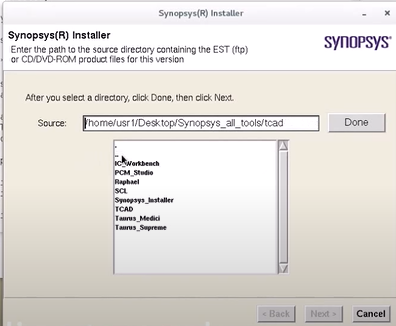
Step-3.2: Next we need to provide the source location where the tools is kept which we want to install.

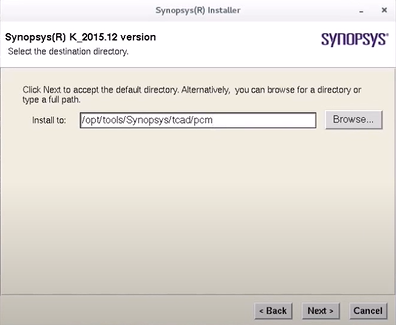
Step-3.3: Next we need to provide the destination location where we want to install the tool.

Step-3.4: Next we need to accept and proceed, after that installation will be started.


 In the same way, we can install all the tools.Once we done with installation we need to configure the license and set a path of all the tools in form of a bashrc/cshrc file. That will be explained in seprate article.


Thanks


10 April

EDA tools in ASIC Industry

  We have noticed that when a person enters into the ASIC industry, He/She comes across various EDA tools of different EDA companies.  It's natural for experienced professionals that the name of tools/company easily gets remembered, but for the freshers, they often forget the name because it's new for them. It has also been noticed that in interviews sometimes interviewers ask the tool's name on which candidate has worked just to get the idea that which areas they have explored. Although remembering the tool's name does not define the level of intelligence of the candidate but of course, if you are not able to tell the name of the tools on which you have worked, will not give a good impression before the interviewer. It is always good to keep some information beyond your initial experience. For example, one might have worked only one STA tool say primeTime, but it's good to know what are other tools being used in Industry. 

This article will let you know the major EDA tools which are being widely used in the ASIC industry for different purposes. Each tool has some specialty over others but that is not a part of this article. We are not going to compare them. Here we will learn the popular tools used in ASIC Industries for various purposes and their company name. 

Kidly note that there are only a handful of EDA companies exists in the industry because If we look over the history of EDA company, we will find that there are lots of mergers and acquisitions had happened in this sector in past. Many new companies have come with their new innovative tool in past but somehow those have been acquired by the big players of this sector, and finally, the number of major EDA companies in the industry is very handful namely Cadence Design System, Synopsys, Mentor Graphics (now Siemens) and few more.

 Here we will categorize the major tools and their vendor as per their utility. I request to my readers there are lots of updates going on, many new tools beings launched every year, Therefore if I missed something important keep adding those in the comments, I will keep updating the list.


PurposesToolcompany

RTL SimulationsVCSSynopsys

XceliumCadence Design System

NC-SimCadence Design System

QuestaSim
Mentor Graphics (Now Siemens)

ModelSim
Mentor Graphics (Now Siemens)

ISE SimulatorXilinx

IncisiveCadence Design System

RTL SignoffSpyGlassSynopsys

JasperGoldCadence Design System

Logic SynthesisFusion Compiler (RTL-to-GDSII solution)Synopsys

Design CompilerSynopsy

Genus Synthesis SolutionCadence Design System

RTL Compiler (upgraded to Genus)
Cadence Design System

LECConformalCadence Design System

FormalitySynopsys

Place and RouteInnovusCadence Design System

IC Compiler (ICC)Synopsys

Encounter (upgraded to Innovus)Cadence Design System

RC ExtractionQuantus RC ExtractionCadence Design System

StarRCSynopsys

STAprimeTimeSynopsys

TempusCadence Design System

Tweaker
Dorado (Now a part of Synopsys)

Encounter Timing System (ETS)Cadence Design System

IR AnalysisVoltusCadence Design System

RedHawkAnsys

Pyhsical Verification
(Fill, DRC, LVS,
Antenna, PERC)
Calibre
Mentor Graphics (Now Siemens)

IC ValidatorSynopsys

PegasusCadence Design System

PVS (Physical Verification System)
Cadence Design System

Power simulationJulesCadence Design System

There are some other useful tools here.


ToolsUsed forCompany Name

OrCADPCB Design, Digital DesignCadence Design System

SpectreSPICE SimulationCadence Design System

HSPICESPICE SimulationSynopsys

VirtuosoSchematic and Layout EditorCadence Design System

Custom DesignerSchematic and Layout EditorSynopsys

AbstractAbstract generation (.lef)Cadence Design System

Custom Waveview
Waveform viewer of simulated result
Synopsys

Sentaurus SDevice
Device SimulatorSynopsys

Sentaurus SProcess
Processes editorSynopsys

Sentaurus SeditGUI of device editorSynopsys

Svisual
visual tool for device and waveform
Synopsys

3D TCAD3D Device simulationSynopsys

Silvaco TCADTCAD ToolSilvaco

ICCAPDevice characterization/TestingKeySight

LiberateLibrary characterization (.lib)Cadence Design System

LT SpiceA free SPICE simulatorLinear Technology

Thank You! 

If you feel, Something important is missing from this list, feel free to comment.