05 June

Installation of Synopsys EDA tools

Most of the EDA tools used in the VLSI Industry are designed for use in UNIX operating system. These tools must require licenses to work which can be purchased from EDA Companies or a company that is authorized for sales and supports. Synopsys tools can be purchased either from www.synopsys.com or from authorized sales and support partner www.eigen.in (in India). 

Once you buy the tools, they provide login credentials on their website. Using the login credential the licenses and tools can be downloaded to your local machine/server. We can also update the licenses whenever it gets expired and we can also download the latest release of any tools from the website using the login credential. For Synopsys tools, we need to login into their official website https://solvnet.synopsys.com to download the tools and licenses.

Generally, EDA companies provide support to install the tools and help in case of any issue, but it's better to know the installation process of tools and basic debugging to manage the tools in our own hands. The following section is going to describe how to download and install the Synopsys tools in your local machine/server.

Step-1: Download the synopsys installer, SCL and tools setup files

Go to https://solvnet.synopsys.com and login with your login credentials.

Solvenet Login

After login, you need to download:

  1. Synopsys Installer (An application which provinde nice gui interface to install the tools)
  2. SCL (Synopsys Common Licensing)
  3. All the EDA tools which you have license and want to install.
  4. Synopsys license (Incase it is not set already)
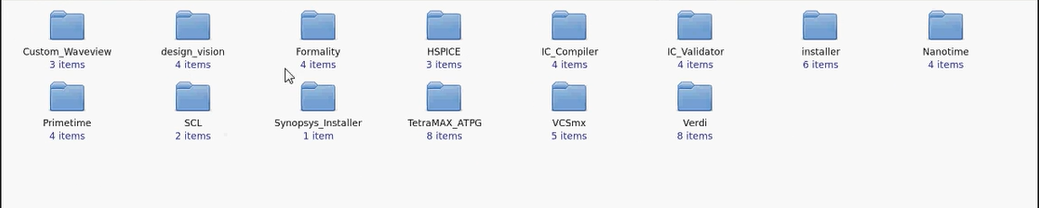

Step-2: Launch the synopsys installer GUI

Step-2.1: Open the terminal with root prevelage and go to the directory where synopsys installer is downloaded.


Step-2.2: Provide the execute permission to the synopsysInstaller.

chmod 755 synopsysInstaller_V3.2.run

Step-2.3: Run the following commands to unpack the installer ( -d switch is for creating a directory)

 ./synopsysInstaller_V3.2.run -d installer

Step-2.4: Go to installer directory created in above step and if you see the contents, it will look like. 

cd installer

ls installer 


Step-2.5: Now we have to launch the installer in GUI mode by following command.

./installer -gui 

Step-3: Provide the source location (installation setup directory) and destination location (directory where you want to install the tool)

Step-3.1: After above step a GUI will be opened up. Now when we click to start, it will ask to site ID which is provided by synopsys when you purchase the tool.


Step-3.2: Next we need to provide the source location where the tools is kept which we want to install.
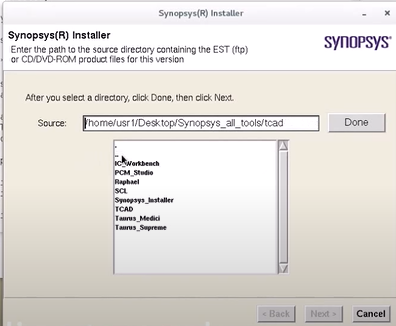

Step-3.3: Next we need to provide the destination location where we want to install the tool.
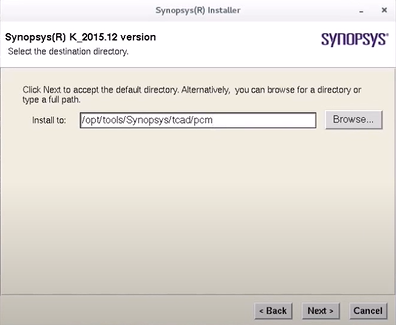

Step-3.4: Next we need to accept and proceed, after that installation will be started.


 In the same way, we can install all the tools.Once we done with installation we need to configure the license and set a path of all the tools in form of a bashrc/cshrc file. That will be explained in seprate article.


Thanks


29 May

Temperature Inversion in VLSI

If a simple question comes before you that "What will impact on the delay of a standard cell if temperature varies? " Are you going to answer straightforward the delay of the cell will increase with temperature OR The delay of the cell will decrease with temperature? If you are going with either of the above answers, Then you need to spare some moment in this article and understand the concept of Temperature Inversion.


Figure-1: Trend of cell delay with temperature


What is temperature inversion?

In general, as temperature increases, the delay of standard cells increases because of mobility degradation at higher temperatures. But in lower technology nodes the impact of temperature on the delay of the cell is inverse. In lower nodes, the delay of the cell decreases with an increase in temperature. So in the lower technology node, the effect of temperature on the delay of the cell is inverted and this effect is called the temperature inversion. The main reason behind this inversion is in the lower technology node, the effect of the threshold voltage is dominating over the mobility. 

So an appropriate answer to the above question could be we should answer this question with respect to the technology node. One can say that at the lower technology nodes as temperature increases the delay of cell decreases. Here lower technology node means the technology node below 65nm. Why part of this question is important, but we should wait if it is asked further. In the next part, we will learn why temperature inversion occurs.

Figure-2: Temperature inversion

The following section will explain in detail of factors affecting the delay of cells and their variation.


Reason for temperature inversion

The delay of a cell is simply the time required to charge/discharge the load capacitance. The charging and discharging time of the load capacitor depends on the drain current. If the drain current is high, it will take a lesser time to charge/discharge the load capacitor and so delay will be lesser and vice-versa. Now let's see the dependency of drain current Id.

The saturation current of MOSFET is,

The drain current Id is directly proportional to the mobility of charge carriers. So as the temperature increases, the lattice scattering increases, and ultimately the mobility of the charge carrier decreases which leads to the decrease in drain current Id and so it increases in the delay of the cell. 

Now let's come to the second important factor, the term (Vgs - Vt) in the above equation is called overdrive voltage. There is a variation in threshold voltage with temperature as per the following equation,

As temperature increases, the threshold voltage decrease, and overdrive voltage increases. This overdrive voltage is more dominating in the lower technology node because in the lower technology node the Vgs and Vt are more closers and so a slight change in Vt will have more impact on overdrive voltage. But in a higher technology node since Vgs is much larger than Vt so a slight change in Vt not causes much change in overdrive voltage. Again the Id is proportional to the squire of overdrive voltage. So changes in overdrive voltage are further amplified and it is dominating over the mobility in lower technology node. 


In a nutshell, In a lower technology node, as temperature increases the threshold voltage decreases so overdrive voltage and drain current increase which leads decrease in cell delay. Here overdrive voltage is dominating over the mobility factor. But in higher technology nodes, overdrive voltage is not much dominating, and delay of the cell varies as per variation in carrier mobility and we have discussed as temperature increases mobility decreases and so drain current decreases which lead increase in cell delay. 

So There are two major factors that drive the variation in cell delay, mobility and overdrive voltage. In lower technology nodes overdrive voltage is more dominating which causes the temperature inversion effect.

Thank you.


28 April

Interview questions asked for DFT Engineer (Fresher) - Question Set - 07


Code: INTL0Y032021DFT


This interview was held for the position of DFT Engineer with 0 years of experience. I personally felt the questions are good and generic which will help the freshers in other domains too.


Round-1:

1) Differences between MOSFET and FINFET ?
2) Puzzle:  A blind man walking in a desert has 2 red pills and 2 blue pills with him. He has to take one red pill and one blue pill each per day. How can he do that correctly?
3) Limitations of MOSFET
4) Puzzle: If a man climbs 15 m well. He climbs 4 m every day and slips 3 m . How many days it takes for him to get outside of the well?
5) What is set up time and hold time?
6) What is set up time and hold time violations?

7) What is metastability and do you know its physical significance?
8) What is a critical path?
9) How can you improve the timing?
10) How can you fix the setup time violations?
11) Implement a 2:1 mux for AND gate?
12) Draw the timing diagram of half adder?
13) What is blocking and non-blocking assignments?

14) What is synchronous and Asynchronous reset?

15) Why do we need DFT and what do you mean by that ?
16) Explain briefly the methods of DFT?
17) Why do you need to make flip flops initialized in an ad hoc technique?
18) What are controllability and observability?
19) If you fabricate a full adder and do the functional test and verify outputs are correct, then do you still require DFT also?
20) What is BIST?
21) What is JTAG?
22) Difference between verification and DFT?
23) What is yield?
24) Explain your course works and the projects.
25) Difference between RAM, ROM.
26) What is DMA?


Round-2:

1) Short channel effects in MOSFET.
2) Brief about JTAG.
3) Any insight into BSDL.
4) What are the different faults that occur while fabrication?
5) What is bridging fault?
6) What is fault collapsing?
7) Draw a D-flipflop along with a timing diagram.
8) What is Stuck at faults?


9) What do you mean by clock skew?
10) Is Hold time dependent on clock frequency?
11) Is clock skew an advantage or not?
12) Current technology node used in industry?
13) Is set up time-dependent on clock frequency?
14) Why do you need a reset in flip flop?
15) What is the multicycle path?
16) Any tools for DFT?

17) Why DFT is in the front end?
18) VLSI design flow.
19) OR gate using 2:1 mux
20) How to do if statement synthesis?
21) How do a case statement in Verilog synthesis?
22) What is Inferred latch?
23) List out a few Power optimization methods in STA.


My sincere thanks to the teamVLSI member who shared this genuine question set with us. If you feel such questions help you in your interview preparation, You are encouraged to share your interview questions with us at teamvlsi2014@gmail.com and help the community as you are getting help.


25 April

Multi Bit Flip Flop Vs Single Bit Flip Flops

In modern ASIC design use of multi-bit flip flops (MBFF) has increased due to its various promising advantages of MBFF over single-bit flip flop (SBFF). Traditionally we study only a single-bit flip flop in our academics. So it becomes important to understand the design of multi-bit flip-flops, how it works, and what are the advantages/disadvantages of multi-bit flip-flops over single-bit flip-flops.


Why Multi-bit Flip Flops?

Multi-bit flip flop has many advantages due to its architecture over the single-bit flip flop. There are many recent research publications also which show these facts with proper statics. We also witness these advantages while place and route (PnR) implementation. Here I  would like to explain the basic facts of MBFF in a simple way without any detailed statics. The exact statics can be referred from any recent research publications. The main advantages of multi-bit flip flop are as follows and that's why MBFF is used widely now a day. 
  1. Area reduction
  2. Power reduction (promising for low power designs)
  3. Better clock skew control
  4. Timing improvement
So we can say that it improves the area, power, and timing. The reason for these advantages will be explained in the next section.


Multi-bit Flip Flop Architecture:

All the advantages of multi-bit flip-flops are due to their architecture. A single-bit FF and a 2-bit MBFF schematic have shown in the figure-1. A similar architecture can imagine for higher bit MBFF also.


Figure -1: Multi-Bit Flip Flop

One can notice that the inverter count reduces when we use the multi-bit flip flop as compare to the single-bit flip flop. The effect of this reduction is more visible when we use bigger MBFF. A comparison of inverter count in SBFF and MBFF has shown in figure-2.

Figure-2: Number of Inverters used in SBFF and MBFF


Instead of 16 inverters inside 8 single-bit flip flops, there are only 2 inverters used inside a 16-bit flip flop. A  schematic of 8-bit MBFF has shown in figure-3.

Figure-3: 8-bit MBFF

As the number of inverters reduced in the case of MBFF, it saves the clock power and area. There is no change in the operation of flops after MBFF conversion. Now let's discuss the mechanism of how PnR tools convert the SBFFs into MBFFs.


MBFF conversion: 

Figure-4: Placement of flops before MBFF conversion


Figure-5: Placement of MBFF after conversion

Figures 4 and 5, show how the conversion of SBFF into MBFF. Figure-4 is showing the scenario before MBFF conversion is done and figure-5 shows the scenario after MBFF conversion. In figure-5, we can see that instead of 8 different SBFF only one 8-bit MBFF is used. So MBFF is generally bigger in size and having multi-row height standard cell. 
PnR tools have algorithms to convert SBFF into MBFF. The tool picks the equivalent MBFF available in the standard cell library and performs the conversion with respect to the user input provided for conversion. This conversion happens in the placement stage.
If we talk about the Cadence Innovus tool, we have a command 
setOptMode -multiBitFlopOpt true 
Which enables PnR tools for multibit flop conversion. By default, this conversion is disabled in the tool. There are many such commands in the tool which can be explored further.
 

Thanks.

10 April

EDA tools in ASIC Industry

  We have noticed that when a person enters into the ASIC industry, He/She comes across various EDA tools of different EDA companies.  It's natural for experienced professionals that the name of tools/company easily gets remembered, but for the freshers, they often forget the name because it's new for them. It has also been noticed that in interviews sometimes interviewers ask the tool's name on which candidate has worked just to get the idea that which areas they have explored. Although remembering the tool's name does not define the level of intelligence of the candidate but of course, if you are not able to tell the name of the tools on which you have worked, will not give a good impression before the interviewer. It is always good to keep some information beyond your initial experience. For example, one might have worked only one STA tool say primeTime, but it's good to know what are other tools being used in Industry. 

This article will let you know the major EDA tools which are being widely used in the ASIC industry for different purposes. Each tool has some specialty over others but that is not a part of this article. We are not going to compare them. Here we will learn the popular tools used in ASIC Industries for various purposes and their company name. 

Kidly note that there are only a handful of EDA companies exists in the industry because If we look over the history of EDA company, we will find that there are lots of mergers and acquisitions had happened in this sector in past. Many new companies have come with their new innovative tool in past but somehow those have been acquired by the big players of this sector, and finally, the number of major EDA companies in the industry is very handful namely Cadence Design System, Synopsys, Mentor Graphics (now Siemens) and few more.

 Here we will categorize the major tools and their vendor as per their utility. I request to my readers there are lots of updates going on, many new tools beings launched every year, Therefore if I missed something important keep adding those in the comments, I will keep updating the list.


PurposesToolcompany

RTL SimulationsVCSSynopsys

XceliumCadence Design System

NC-SimCadence Design System

QuestaSim
Mentor Graphics (Now Siemens)

ModelSim
Mentor Graphics (Now Siemens)

ISE SimulatorXilinx

IncisiveCadence Design System

RTL SignoffSpyGlassSynopsys

JasperGoldCadence Design System

Logic SynthesisFusion Compiler (RTL-to-GDSII solution)Synopsys

Design CompilerSynopsy

Genus Synthesis SolutionCadence Design System

RTL Compiler (upgraded to Genus)
Cadence Design System

LECConformalCadence Design System

FormalitySynopsys

Place and RouteInnovusCadence Design System

IC Compiler (ICC)Synopsys

Encounter (upgraded to Innovus)Cadence Design System

RC ExtractionQuantus RC ExtractionCadence Design System

StarRCSynopsys

STAprimeTimeSynopsys

TempusCadence Design System

Tweaker
Dorado (Now a part of Synopsys)

Encounter Timing System (ETS)Cadence Design System

IR AnalysisVoltusCadence Design System

RedHawkAnsys

Pyhsical Verification
(Fill, DRC, LVS,
Antenna, PERC)
Calibre
Mentor Graphics (Now Siemens)

IC ValidatorSynopsys

PegasusCadence Design System

PVS (Physical Verification System)
Cadence Design System

Power simulationJulesCadence Design System

There are some other useful tools here.


ToolsUsed forCompany Name

OrCADPCB Design, Digital DesignCadence Design System

SpectreSPICE SimulationCadence Design System

HSPICESPICE SimulationSynopsys

VirtuosoSchematic and Layout EditorCadence Design System

Custom DesignerSchematic and Layout EditorSynopsys

AbstractAbstract generation (.lef)Cadence Design System

Custom Waveview
Waveform viewer of simulated result
Synopsys

Sentaurus SDevice
Device SimulatorSynopsys

Sentaurus SProcess
Processes editorSynopsys

Sentaurus SeditGUI of device editorSynopsys

Svisual
visual tool for device and waveform
Synopsys

3D TCAD3D Device simulationSynopsys

Silvaco TCADTCAD ToolSilvaco

ICCAPDevice characterization/TestingKeySight

LiberateLibrary characterization (.lib)Cadence Design System

LT SpiceA free SPICE simulatorLinear Technology

Thank You! 

If you feel, Something important is missing from this list, feel free to comment.