08 July

Placement Steps in Physical Design

Placement is a very important stage of physical design where all the standard cells get placed inside the core boundary. Overall QoR of the design greatly depends on the fact that how well placement is done. You must have noticed that the placement stage takes quite a large runtime. Actually, the tool performs various steps in a sequence to complete the placement stage. In this article, we will try to understand what are the important steps and the order in which the EDA tools perform to complete the placement stage.

Placement is the process of placing the standard cells inside the core boundary in an optimal location. The tool tries to place the standard cell in such a way that the design should have minimal congestions and the best timing. Every PnR tool provides various commands/switches so that users can optimize the design in a better way in terms of timing, congestion, area, and power as per their requirements. Based on the preferences set by the user, the tool tray to place and optimize it for better QoR. Placement does not place only the standard cells present in the synthesized netlist but also places many physical only cells and adds buffers/inverters as per the requirement to meet the timings, DRV, and foundry requirements. Here are the basic steps which the tool performs during the placement and optimization stage.


placement steps:

  1. Pre Placement
  2. Initial Placement / Course Placement / Global Placement
  3. Legalization
  4. HFNS (Hign Fanout Net Synthesis)
  5. Iteration for Congestion, Timing, DRV, and Power Optimization
  6. Multibit flop conversion
  7. Timing optimization iterations
  8. Scan-Chain Reorder
  9. Tie Cell insertion
  10. Save Design


1. Pre Placement:


Figure-1: Pre-placement step

Before starting the actual placement of the standard cells present in the synthesized netlist, we need to place various physical only cells like end-cap cells, well-tap cells, IO buffers, antenna diodes, and spare cells. A typical view after preplacement has shown in figure-1. Why these cells are required to place and how do we place them has been discussed separately in this article. Here we will focus mainly on the placement steps of standard cells present in the synthesized netlist.

2. Initial Placement / Global Placement / Course Placement 


Figure-2: Global placement before legalization

Once the pre Placement stage has been completed, We can start the placement of standard cells but before that, we have to provide all the correct placement and optimization settings that we want to be applied while the tool does the placement and optimization. These settings could be like partial placement blockage or density screen setting, bound or region creation, cell/instance padding, path_groups and effort, enabling the early clock flow (ECF) in case of innovus, enabling the extreme flow, enabling the useful skew, global congestion effort, global timing effort, power effort, Multibit flop conversion and many more.

After providing all these placement settings we can call the placement command (place_opt_design in case of innovus). The tool first does the global placement in which the tool determines the approximate location of each cell according to the timing, congestion, and multi-voltage constraints (in the case of innovus Gigaplace engine is called in this step). Any pre-placed macros will work as a placement blockage. In this stage, the tool will not check any overlap of instances. A typical figure of global placement has shown in figure-2 where you can see that the standard cells are placed in an approximate location but without legalization. 


3. Legalization

In the global placement stage, the instances are left with overlap. In this step, the tool will move the instances in nearby places to overcome the overlap. To match the proper power pins like the vdd pin of a standard cell should be on the vdd rail and vss on vss rail and for that if the fliping of instance is required tool also do the flipping. This process is called legalization. After this step, every instance should be placed in a legal location and there should be no overlaps. This step is also called refine placement.

4. HFNS (Hign Fanout Net Synthesis)

Initially, there are some nets which have very high numbers of fanout. We have a constraint of maximum fanout, so we need to distribute the sinks on nets to different drivers. The process of adding buffers and splitting the fanout is called high fanout net synthesis (HFNS). So In this step, all high fanout nets get synthesized.

5. Iteration for Congestion, Timing, DRV, and Power Optimization

In this step tool first, do an early global route and estimate the routing overflow/congestions in the design. The tool tries to initially minimize the congestion in this stage. Next, the tool starts the RC extraction to calculate the delay for setup analysis. The tool tries to minimize the setup WNS and TNS in this step. Similarly, the tool also tries to minimize the DRV and Power in this stage.

6. Multibit flop conversion

If the user enables the multi-bit flip flop conversion in the flow then the tool will first check the available multibit flops in the library. (You can read more about multi-bit cell here) The tool considers the criticality of timing associated with a single bit of flop and the user constraint set for multi-bit conversion and based on the constraints the tool converts the single-bit flop into multibit flops.

7. Timing optimization iterations

This is a long step in which the tool tries to minimize the WNS and TNS of each path group in various iterations. There are several iterations required to get a minimum WNS and TNS depending upon the effort set and initial WNS number. In case the result is not good after this stage, we can further run incremental optimization for timing. Similarly, for congetion, we can run congestion repair followed by incremental optimization to get a better result. But these additional steps will increse the run time.

8. Scan-Chain Reorder


Figure-3: Scan Chain before placement

Scan chain stitching has been done arbitrarily in synthesis. After placement and optimization, we have a location for each scan flops so it needs to be reordered for better routability. The tool performs a reordering of the scan chain in this step which is good for both timing and congestions. 

Figure-4: Scan chain after placement

Figure-5: Scan Chain after Scan chain reodrder


9. Tie Cell insertion

There are some unused inputs of logic gates in the netlist which is tied to either vdd or vss. We can not leave any inputs of the standard cell as floating, it must be tied either vdd or vss. Connecting an input of logic cell that is the gate of a transistor directly to vdd or vss is not recommended and for that, we have tie high and tie low cells in the library. (You may watch this video on tie cells for more details). So In this step tool places tie high and tie low cells which is basically a single output logic cell, and it connects the input of the logic gate which needs to connect vdd or vss respectively. 

10. Save Design

Finally, we save the database and we will use this database in the next stage, that is in the clock tree synthesis.

28 June

Clock Tree Constraints in VLSI | ccopt file in Physical Design | CTS Constraints

Clock tree synthesis is a process of building and optimizing the clock tree in such a way that the clock gets distributed evenly and every sequential element gets the clock within a target global skew limit. To build the clock tree we have to provide certain constraints as input to the APR tool, which commonly known as clock constraints, and in the case of the Innovus tool, this constraint file is popularly known as ccopt file.

In this article, we will learn some important clock tree constraints which are commonly used in every design and their actual meaning that why those constraints provided. Now a day it's very common that if you are going to appear in an interview in physical design and your experience is in the bracket of 0-5Y, you have to face the question related to clock tree constraints in your interview.


clocks tree constraints:

  1. Clock tree cell list
  2. Preferred clock tree routing layers and Non-Default Rules (NDR)
  3. Target Skew
  4. Target Maximum Transition
  5. Target Maximum Capacitance
  6. Maximum Fanout
  7. Cell Density
  8. Cell Halo 

1. Clock tree cell list

We use clock inverters and clock buffers in the clock tree building. Sometimes we use only clock inverters and not clock buffers. We also use clock gating cells in the clock tree. so we have to provide the list of cells that we want to use in the clock tree.

set_ccopt_property inverter_cells {}
set_ccopt_property buffer_cells {}
set_ccopt_property clock_gating_cells {}
set_ccopt_property logic_cells {}

2. Preferred clock tree routing layers and Non-Default Rules (NDR)

We need to provide the top and bottom preferred routing layer for clock tree nets. We generally define here trunk and leaf net. the net which connects the clock to the sequential element's clock pin is called the leaf net and the net which delivers the clock to the leaf net is called trunk net.

set_ccopt_property  -name trunckRoute -top_preferred_layer <> -bottom_preferred_layer <> -preferred_routing_layer_effort high -non_default_rule 2w2s

set_ccopt_property  -name leafRoute -top_preferred_layer <> -bottom_preferred_layer <> -preferred_routing_layer_effort high -non_default_rule 1w2s

3. Target skew

Skew balancing is one of the challenges in clock tree optimization. We provide a target skew as a clock tree constraint. PnR tool will try to balance the skew within the given limit of skew.

set_ccopt_property -target_skew <> 

4. Target Maximum Transition

We provide a max_trans limit for clock nets in the clock tree constraint. The tool will try to meet the max_trans limit.

set_ccopt_property -target_max_trans <> 

5. Target Maximum Capacitance

We provide a max_cap limit for clock nets in the clock tree constraint. The tool will try to distribute the load capacitance and try to meet the max_cap limit.

set_ccopt_property -target_max_capacitance <> 

6. Maximum fanout

We limit the maximum fanout of any instance in the clock tree through this constraint. Tool will try to build the clock tree by following this limit. 

set_ccopt_property -max_fanout <> 

7. Cell Density

A maximum cell density limit is mandatory for the clock tree instances.

set_ccopt_property -cell_density <>

8. Cell Halo

We need to provide a halo around the clock tree instance to avoid a denser placement which may cause IR / Crosstalk issue. So we provide halo constraints in the x and y direction over the cells.

set_ccopt_property -cell_halo_x <>  
set_ccopt_property -cell_halo_y <>  


These are the main constraint which we provide before the clock tree building. There are some more constraints but the main constraints are explained in the above sections. The following image summarizes the clock tree constraints.

CTS Constraints


Thank you! Any suggestions are welcomed in the comment section.

05 June

Installation of Synopsys EDA tools

Most of the EDA tools used in the VLSI Industry are designed for use in UNIX operating system. These tools must require licenses to work which can be purchased from EDA Companies or a company that is authorized for sales and supports. Synopsys tools can be purchased either from www.synopsys.com or from authorized sales and support partner www.eigen.in (in India). 

Once you buy the tools, they provide login credentials on their website. Using the login credential the licenses and tools can be downloaded to your local machine/server. We can also update the licenses whenever it gets expired and we can also download the latest release of any tools from the website using the login credential. For Synopsys tools, we need to login into their official website https://solvnet.synopsys.com to download the tools and licenses.

Generally, EDA companies provide support to install the tools and help in case of any issue, but it's better to know the installation process of tools and basic debugging to manage the tools in our own hands. The following section is going to describe how to download and install the Synopsys tools in your local machine/server.

Step-1: Download the synopsys installer, SCL and tools setup files

Go to https://solvnet.synopsys.com and login with your login credentials.

Solvenet Login

After login, you need to download:

  1. Synopsys Installer (An application which provinde nice gui interface to install the tools)
  2. SCL (Synopsys Common Licensing)
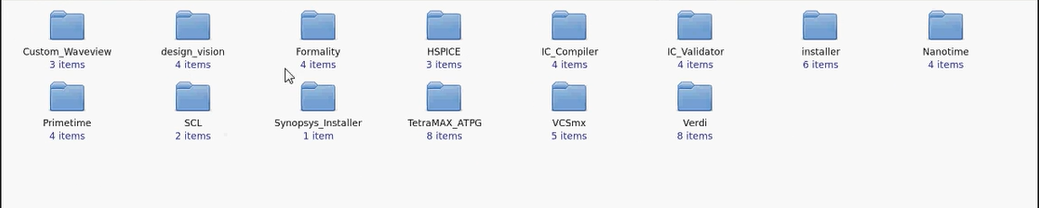
  3. All the EDA tools which you have license and want to install.
  4. Synopsys license (Incase it is not set already)


Step-2: Launch the synopsys installer GUI

Step-2.1: Open the terminal with root prevelage and go to the directory where synopsys installer is downloaded.


Step-2.2: Provide the execute permission to the synopsysInstaller.

chmod 755 synopsysInstaller_V3.2.run

Step-2.3: Run the following commands to unpack the installer ( -d switch is for creating a directory)

 ./synopsysInstaller_V3.2.run -d installer

Step-2.4: Go to installer directory created in above step and if you see the contents, it will look like. 

cd installer

ls installer 


Step-2.5: Now we have to launch the installer in GUI mode by following command.

./installer -gui 

Step-3: Provide the source location (installation setup directory) and destination location (directory where you want to install the tool)

Step-3.1: After above step a GUI will be opened up. Now when we click to start, it will ask to site ID which is provided by synopsys when you purchase the tool.


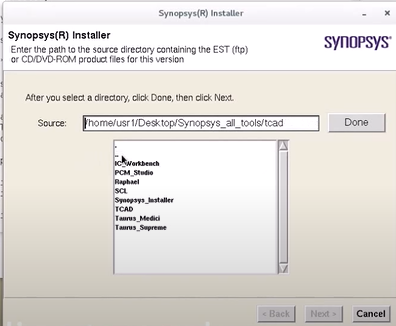
Step-3.2: Next we need to provide the source location where the tools is kept which we want to install.


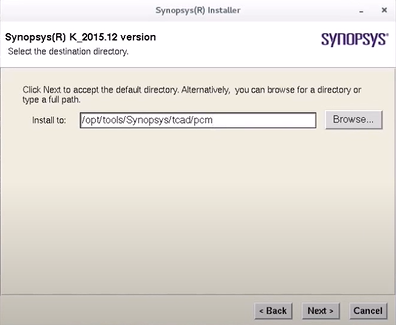
Step-3.3: Next we need to provide the destination location where we want to install the tool.


Step-3.4: Next we need to accept and proceed, after that installation will be started.


 In the same way, we can install all the tools.Once we done with installation we need to configure the license and set a path of all the tools in form of a bashrc/cshrc file. That will be explained in seprate article.


Thanks


29 May

Temperature Inversion in VLSI

If a simple question comes before you that "What will impact on the delay of a standard cell if temperature varies? " Are you going to answer straightforward the delay of the cell will increase with temperature OR The delay of the cell will decrease with temperature? If you are going with either of the above answers, Then you need to spare some moment in this article and understand the concept of Temperature Inversion.


Figure-1: Trend of cell delay with temperature


What is temperature inversion?

In general, as temperature increases, the delay of standard cells increases because of mobility degradation at higher temperatures. But in lower technology nodes the impact of temperature on the delay of the cell is inverse. In lower nodes, the delay of the cell decreases with an increase in temperature. So in the lower technology node, the effect of temperature on the delay of the cell is inverted and this effect is called the temperature inversion. The main reason behind this inversion is in the lower technology node, the effect of the threshold voltage is dominating over the mobility. 

So an appropriate answer to the above question could be we should answer this question with respect to the technology node. One can say that at the lower technology nodes as temperature increases the delay of cell decreases. Here lower technology node means the technology node below 65nm. Why part of this question is important, but we should wait if it is asked further. In the next part, we will learn why temperature inversion occurs.

Figure-2: Temperature inversion

The following section will explain in detail of factors affecting the delay of cells and their variation.


Reason for temperature inversion

The delay of a cell is simply the time required to charge/discharge the load capacitance. The charging and discharging time of the load capacitor depends on the drain current. If the drain current is high, it will take a lesser time to charge/discharge the load capacitor and so delay will be lesser and vice-versa. Now let's see the dependency of drain current Id.

The saturation current of MOSFET is,

The drain current Id is directly proportional to the mobility of charge carriers. So as the temperature increases, the lattice scattering increases, and ultimately the mobility of the charge carrier decreases which leads to the decrease in drain current Id and so it increases in the delay of the cell. 

Now let's come to the second important factor, the term (Vgs - Vt) in the above equation is called overdrive voltage. There is a variation in threshold voltage with temperature as per the following equation,

As temperature increases, the threshold voltage decrease, and overdrive voltage increases. This overdrive voltage is more dominating in the lower technology node because in the lower technology node the Vgs and Vt are more closers and so a slight change in Vt will have more impact on overdrive voltage. But in a higher technology node since Vgs is much larger than Vt so a slight change in Vt not causes much change in overdrive voltage. Again the Id is proportional to the squire of overdrive voltage. So changes in overdrive voltage are further amplified and it is dominating over the mobility in lower technology node. 


In a nutshell, In a lower technology node, as temperature increases the threshold voltage decreases so overdrive voltage and drain current increase which leads decrease in cell delay. Here overdrive voltage is dominating over the mobility factor. But in higher technology nodes, overdrive voltage is not much dominating, and delay of the cell varies as per variation in carrier mobility and we have discussed as temperature increases mobility decreases and so drain current decreases which lead increase in cell delay. 

So There are two major factors that drive the variation in cell delay, mobility and overdrive voltage. In lower technology nodes overdrive voltage is more dominating which causes the temperature inversion effect.

Thank you.


28 April

Interview questions asked for DFT Engineer (Fresher) - Question Set - 07


Code: INTL0Y032021DFT


This interview was held for the position of DFT Engineer with 0 years of experience. I personally felt the questions are good and generic which will help the freshers in other domains too.


Round-1:

1) Differences between MOSFET and FINFET ?
2) Puzzle:  A blind man walking in a desert has 2 red pills and 2 blue pills with him. He has to take one red pill and one blue pill each per day. How can he do that correctly?
3) Limitations of MOSFET
4) Puzzle: If a man climbs 15 m well. He climbs 4 m every day and slips 3 m . How many days it takes for him to get outside of the well?
5) What is set up time and hold time?
6) What is set up time and hold time violations?

7) What is metastability and do you know its physical significance?
8) What is a critical path?
9) How can you improve the timing?
10) How can you fix the setup time violations?
11) Implement a 2:1 mux for AND gate?
12) Draw the timing diagram of half adder?
13) What is blocking and non-blocking assignments?

14) What is synchronous and Asynchronous reset?

15) Why do we need DFT and what do you mean by that ?
16) Explain briefly the methods of DFT?
17) Why do you need to make flip flops initialized in an ad hoc technique?
18) What are controllability and observability?
19) If you fabricate a full adder and do the functional test and verify outputs are correct, then do you still require DFT also?
20) What is BIST?
21) What is JTAG?
22) Difference between verification and DFT?
23) What is yield?
24) Explain your course works and the projects.
25) Difference between RAM, ROM.
26) What is DMA?


Round-2:

1) Short channel effects in MOSFET.
2) Brief about JTAG.
3) Any insight into BSDL.
4) What are the different faults that occur while fabrication?
5) What is bridging fault?
6) What is fault collapsing?
7) Draw a D-flipflop along with a timing diagram.
8) What is Stuck at faults?


9) What do you mean by clock skew?
10) Is Hold time dependent on clock frequency?
11) Is clock skew an advantage or not?
12) Current technology node used in industry?
13) Is set up time-dependent on clock frequency?
14) Why do you need a reset in flip flop?
15) What is the multicycle path?
16) Any tools for DFT?

17) Why DFT is in the front end?
18) VLSI design flow.
19) OR gate using 2:1 mux
20) How to do if statement synthesis?
21) How do a case statement in Verilog synthesis?
22) What is Inferred latch?
23) List out a few Power optimization methods in STA.


My sincere thanks to the teamVLSI member who shared this genuine question set with us. If you feel such questions help you in your interview preparation, You are encouraged to share your interview questions with us at teamvlsi2014@gmail.com and help the community as you are getting help.


25 April

Multi Bit Flip Flop Vs Single Bit Flip Flops

In modern ASIC design use of multi-bit flip flops (MBFF) has increased due to its various promising advantages of MBFF over single-bit flip flop (SBFF). Traditionally we study only a single-bit flip flop in our academics. So it becomes important to understand the design of multi-bit flip-flops, how it works, and what are the advantages/disadvantages of multi-bit flip-flops over single-bit flip-flops.


Why Multi-bit Flip Flops?

Multi-bit flip flop has many advantages due to its architecture over the single-bit flip flop. There are many recent research publications also which show these facts with proper statics. We also witness these advantages while place and route (PnR) implementation. Here I  would like to explain the basic facts of MBFF in a simple way without any detailed statics. The exact statics can be referred from any recent research publications. The main advantages of multi-bit flip flop are as follows and that's why MBFF is used widely now a day. 
  1. Area reduction
  2. Power reduction (promising for low power designs)
  3. Better clock skew control
  4. Timing improvement
So we can say that it improves the area, power, and timing. The reason for these advantages will be explained in the next section.


Multi-bit Flip Flop Architecture:

All the advantages of multi-bit flip-flops are due to their architecture. A single-bit FF and a 2-bit MBFF schematic have shown in the figure-1. A similar architecture can imagine for higher bit MBFF also.


Figure -1: Multi-Bit Flip Flop

One can notice that the inverter count reduces when we use the multi-bit flip flop as compare to the single-bit flip flop. The effect of this reduction is more visible when we use bigger MBFF. A comparison of inverter count in SBFF and MBFF has shown in figure-2.

Figure-2: Number of Inverters used in SBFF and MBFF


Instead of 16 inverters inside 8 single-bit flip flops, there are only 2 inverters used inside a 16-bit flip flop. A  schematic of 8-bit MBFF has shown in figure-3.

Figure-3: 8-bit MBFF

As the number of inverters reduced in the case of MBFF, it saves the clock power and area. There is no change in the operation of flops after MBFF conversion. Now let's discuss the mechanism of how PnR tools convert the SBFFs into MBFFs.


MBFF conversion: 

Figure-4: Placement of flops before MBFF conversion


Figure-5: Placement of MBFF after conversion

Figures 4 and 5, show how the conversion of SBFF into MBFF. Figure-4 is showing the scenario before MBFF conversion is done and figure-5 shows the scenario after MBFF conversion. In figure-5, we can see that instead of 8 different SBFF only one 8-bit MBFF is used. So MBFF is generally bigger in size and having multi-row height standard cell. 
PnR tools have algorithms to convert SBFF into MBFF. The tool picks the equivalent MBFF available in the standard cell library and performs the conversion with respect to the user input provided for conversion. This conversion happens in the placement stage.
If we talk about the Cadence Innovus tool, we have a command 
setOptMode -multiBitFlopOpt true 
Which enables PnR tools for multibit flop conversion. By default, this conversion is disabled in the tool. There are many such commands in the tool which can be explored further.
 

Thanks.